

Security, Safety and Privacy
(This post originally written in 2018 for a book chapter that was never published)
Intro
When we, and many other makers, first started playing with a Raspberry Pi and other IoT devices, we were doing it for fun, to learn and experiment. The IoT has grown up very rapidly, and there are many products and services being sold under the banner of IoT. There have been some highly-publicised cases of poorly-secured IoT and home automation devices being compromised and used collectively for DDoS (Distributed Denial of Service) attacks. These incidents bring home to us the great importance of all aspects of security, and in particular for the IoT.
Security of online information is often in the news. Hacked bank accounts,stolen credit card numbers, and emails containing links to malware that capture keystrokes are ways the criminally inclined try to get a lot of money from the comfort of their own home - without having to go out and physically rob a bank.
Hopefully, we have all heard of phishing and how this is used to get hold of our details.
But other things should also concern us - including safety and privacy:
In this post we take a look at how the IoT can be vulnerable to cyber attacks and the basic steps that can be taken to substantially reduce the risks both for the devices we buy and the projects you may develop.
Security
Although blockbuster films may have us believe that successful cyber attacks require highly sophisticated approaches, the reality is that the majority of them 1are just reliant on very simple and basic gaps in security, or simply work by stealing valid usernames and passwords.
To put that another way, many successful cyber intrusions rely on the absence
of basic security measures.
Before we look at security in more detail, let’s first look at a really expensive, early, but very secure, IoT set-up.
Back in 2013 Peter, a fictitious millionaire, had a hyper-connected IoT home. In his new residence, he had invested in connecting everything. Every power socket, light and device in the flat was connected to his internal network and could be controlled from a smart device. Even the Bang and Olufsen media centre, the CCTV cameras inside and outside, and the private elevator were all neatly dovetailed into one hyper-connected system. Peter could control and view everything from the air conditioning to the motorised extractor hood that would unfold above the otherwise flat kitchen island.
He could adjust lighting and switch-on appliances anywhere in the house. He could even do this from work via a secure and encrypted channel called a VPN (Virtual Private Network).
Back in 2013 this was very impressive.
At the back of his shoe cupboard was a reinforced, locked door. Behind the door was a small, air-conditioned mini-server room. The room contained two full racks of switches and servers, together with a state of the art firewall with VPN and a secure server with a very expensive Intrusion and Detection Prevention System (IDPS). Banks of network switch lights twinkled - there were over 200 network connections.
You can imagine that all of this was not cheap. Now, just a few years later, we no longer need to be millionaires to achieve something similar. We no longer need the private server room. Peter had a very secure and robust security architecture in place:- All of his devices were constrained to one very heavily guarded access point to the internet.
One of the significant compromises that we often make nowadays is that in place of a highly secured, discrete infrastructure, we connect each individual device directly to the internet - and this makes us more open to cyber attack.
A chain is only as strong as its weakest link.
So too, our IoT security will be most vulnerable to failure or intrusion where it is weakest.
Even the most tech savvy amongst us are careful not to blindly trust their devices. Mark Zuckerburg was caught on an Instagram photo with tape over his laptop camera and microphone. Edward Snowden states he no longer has a smartphone and he has helped develop a smartphone case which can verify what connections are on or off, to help prevent snooping.
If you were attacking a castle that had sentries guarding the walls on three sides and nobody is watching the fourth side, then it would not take a genius to work out that the most likely point of entry will be the unprotected wall.
If we were to connect a single badly-configured device to Peter’s home network that had its own, independent internet connection, then just like the castle with only three guarded walls, we could have created a wide open back door into his house.
CCTV systems that allow remote viewing can help you keep your premises secure.
However, if someone unauthorised gains access, other people can remotely spy on us or even identify when we are out and we can get burgled.
Although there are many security considerations to make for the Internet of Things, what we trust to connect to what, is the most important of them.
You might think this is obvious, but consider this:
The answer is that I just reduced the security level to that of my connected IoT device.
What would make it even worse is if the IoT device has its own internet connection.
That would mean that information could flow out of my phone to the internet via the connected device - a direction that was not anticipated by the security mechanisms in place on the phone.
So how do we wire up and connect the IoT with better security, both for any projects we develop and for any commercial IoT devices we choose to acquire?
The starting point is always to consider the potential cost, risk and impact of what the IoT device or project is designed to do. In other words, what is the worst potential consequence if it were to go wrong, or if it adversely impacted or infected other devices you expect it to connect to?
The greater the impact, the more care and attention you will want to put on the security you choose to apply. For example, in a Cheerlights Orb Project, if the colours changed colour at the wrong time, to the wrong colour or not at all, the consequences are very minimal. It doesn’t really matter. However, if you were wearing a pacemaker that could be controlled via the internet, it really would matter if someone unauthorised can control it.
The good news is that by taking some basic security steps, it is easy to reduce the risk of being vulnerable to cyber intrusions.
Highly Secure - but no internet access
The military and other highly security environments do something called air-gapping. Put simply, they don’t allow any inbound or outbound connections, and they also prohibit the physical connection of other devices (such as USB memory sticks) that might otherwise carry infections into, or data out of, an environment.
This is a great approach for something like a nuclear reactor. However, it is also not very practical for an IoT device or project to have no inbound and outbound connections whatsoever. It removes the “I” from IoT.
Simple Security measures
To reduce the risks of IoT devices or projects being corrupted or hijacked, we will look at how simple security measures can be applied to:
1. The connections the IoT device can access, or that can access it
2. The IoT device itself
3. The information and applications (software programs) on the device
1. Connection security
The safety and integrity of any IoT device will depend a lot on the safety and security of the networks it can join and the internet connections it can make.
Just as physical contact can spread a biological virus; local, network and internet connections can be used to attack and spread digital contagions.
As we are talking about the IoT, deciding on how and what we will allow our device to connect to is often a primary concern.
There is no point in having a clever home thermostat that can send information to the boiler and washing machine if it has no way to connect to those devices.
However, if we do choose to connect those three items together, then we have essentially decided a level of trust between them that can mean if one of them is compromised, it is more likely than not the others will be also.
So the first security considerations are simply these: - think carefully about what you need your IoT device to connect to. - limit the connections to as few as possible.
It is a good idea to have a basic design in mind for what devices you are going to allow trust between. That design should be based on what level of risk you are prepared to take.
If you create a full ecosystem of trust between all of your IoT devices, it will be possible that any cyber attack or device failure can then cascade those issues throughout your network.
Conversely, if you limit your IoT connection trust to small clusters, it should only be possible to infiltrate the devices in those small clusters.
Be sure to understand what your IoT device connections are. For example, if the connections are only local (within a home network), then you may be able to use network level security to protect it, for example making sure your WiFi network has a password.
However, if the device has its own internet connection and this is enabled, then attaching it to your home network will potentially add a backdoor into your home network security. Think of Peter in his hyper-connected home. His security relied on keeping all his devices talking within a secure network or over a single trusted VPN connection. If he attached a single device into that home network that had a separate and unguarded internet connection, his entire security model could be bypassed.
Where you do set up connections, use the most secure connection type possible.
If your device can set up an encrypted connection (through a VPN service, or secure socket connection (e.g. TLS)), then that can prevent interception.
Transport-Level Security (TLS)
You may have noticed that most web sites these days have an HTTPS:// URL rather than the HTTP://. For example, when you type google.com into your browser, you will notice a little padlock appears, and if you examine the URL you ended up at, it is https://google.com.
The ‘S’ in HTTPS indicates that the connection is using a Secure version of HTTP. Specifically, it is using Transport-Level Security to encrypt an HTTP connection. Most internet applications (such as your web browser, email client, MQTT input node in Node-RED, etc) use a mechanism called a TCP/IP socket to connect the client (on your laptop, phone or tablet) to a server on the internet.
When the connection is secured using TLS, a TCP/IP socket connection is created, then some messages are sent between the client application and the server to agree some security credentials to confirm that the server and possibly also the client are exactly who they claim to be. Once the connection has been authenticated, the socket is secured by agreeing an encryption key that both ends will use when sending data to each other. With this encrypted “tunnel” in place between the client application and the server on the internet, the application and server can talk to each other “in the clear”, that is, using non-encrypted messages, safe in the knowledge that these messages are passing through an encrypted tunnel, and are thus safe from snooping by anyone sitting in the path of the message and capable of observing them. Before sending each message out to the internet, the TLS software in the client application encrypts the data.
Upon receiving an encrypted message, the TLS software at the server end decrypts the message before handing it over to the application, which needs to have no awareness that the message was ever encrypted.
Feedback
Another thing to keep in mind is how much you trust the manufacturer. Almost all IoT devices are designed to send information back to their manufacturer to help improve the product and increase sales. That same information can extend to anything your IoT device can access. Even some smart televisions have the ability to listen to your conversations, transcribe them and send the text off for ‘product improvement’ purposes. (ref http://www.bbc.co.uk/news/technology-31296188)
Many countries are rapidly setting up very low cost wireless internet networks that IoT devices can stay connected to without a subscription plan. This is great for connectivity but does present new security issues.
Security at the device level
Raef Meeuwisse is the author of several cyber publications. He states that many of the steps for reasonable device cybersecurity are actually fairly simple - and suggests basic practical security steps that can be taken at the device level:-
• Always configure your device securely.
• Keep the device up to date with the latest software and operating system updates
• Minimise access privileges, remove the default ability to install new programs
• Use a firewall when possible
• Use anti-malware security solutions when possible
Always configure your device securely.
Often a device can come with many great security features. Make sure that
you enable features wherever practical. For example, always change any default
username and password that the device ships with.
According to Marc Goodman in his book ‘Future Crimes’ - ’Nearly 70 per cent of users never change their default user names such as “user” and “admin” nor do they reset the manufacturer’s preset password, such as “1111” or “1234”.
Trying default usernames and passwords is a typical attack strategy used by cyber criminals. If you place an IoT device on the internet with a default username and password in place, it will most likely not be secure, or remain under your control, for long.
The website www.shodan.io is a search engine of all internet connected devices.
Sites like this can be used to very easily target specific device types or locations, especially those that retain the default settings they ship with.
You can secure your Raspberry Pi by changing the password of the default (pi) account. The most recent versions of the Raspbian operating system enforce this when you first log in to a new installation, but there are still many, many Pis out there with the very well known default username and password.
Changing the password on a Pi
To change the password of the account you’re logged into, on the command line, type:
passwd
You are then prompted to enter a new password twice, and if they match, your password is changed to that.
Node-RED User Credentials
By default, the Node-RED editor is not secured - anyone who can access the IP address and port it is running on can access the editor and deploy changes. Most laptops run firewall software which prevents inbound connections from other devices on the network, so you most likely won’t need a username and password for your local installation, but any instance of Node-RED that you access across a network, should be secured.
You can secure the Node-RED interface and any HTTP content your Node-RED installation is serving. Here we give basic information for securing the Node-RED editor, but more detailed information is available here:
http://nodered.org/docs/security
To set up user credentials for your Node-RED instance, you need to be logged in to your Pi.
There is a section of the Node-RED settings file which relates to this. The settings file is at:
/home/pi/.node-red/settings.js
Open this file in an editor such as nano, and find the section that looks like this:
adminAuth: {
type: "credentials",
users: [{
username: "admin",
password: "$2a$08$zZWtXTja0fB1pzD4sHCMyOCMYz2Z6dNbM6tl8sJogENOMcxWV9DN.",
permissions: "*"
}]
}
You can change the username field to the name you want to log in to Node-RED with.
To create a password, you have to create an encrypted string from the password you wish to use.
To do this, the easiest way is to install the node-red-admin command-line tool, with:
sudo npm install -g node-red-admin
Then type:
node-red-admin hash-w
The tool will prompt you for the password you wish to use and then print out the hash string that can be copied and pasted into the password field of the settings file.
Important: Do not attempt to transcribe this string by hand, as you will not get it right, and then you won’t be able to login to Node-RED.
With these simple security measures, you have dramatically improved the security of your Raspberry Pi and Node-RED installation.
HTTP web services
If you create web services end-points in your Node-RED flows, using HTTP input and output nodes, you should secure them with basic authentication (username and password) in the HTTP request.
When you receive an HTTP request through an HTTP input node, you can examine the supplied basic authentication credentials by accessing msg.req.headers.authorization
This string is base-64 encoded, so you first need to decode it, with a function node containing this code:
var authorisation = msg.req.headers.authorization;
if (authorisation) {
// format of Authorization header in HTTP request:
// Basic QWxhZGfgbjpvcGVuIHNljzFtZQ==
// remove "Basic "
var key = authorisation.replace('Basic ' , '');
// decode base64 encoded string
var decoded = new Buffer(key,'base64').toString('ascii');
// decoded authorisation string is in form: "username:password"
// extract username and password
var (username, password) = decoded.split(':');
}
This gives you the username and password that the user supplied with the request, which you can then check against a collection of known users and their passwords, perhaps held in a file or database of some kind. If you are expecting credentials and you either don’t get any (the authorisation variable is empty in the code above), or they were incorrect (after checking against your list of allowed usernames and password combinations), you return a 401 not authorized return code.
For a request from a web browser, this triggers the familiar username and password pop-up dialogue box so you can enter your credentials before re-submitting the request.
You set the return code for an HTTP request by setting msg.statusCode to the required value before handing it to the HTTP response node.

Figure 1: Returning a 401 not authorized HTTP response code
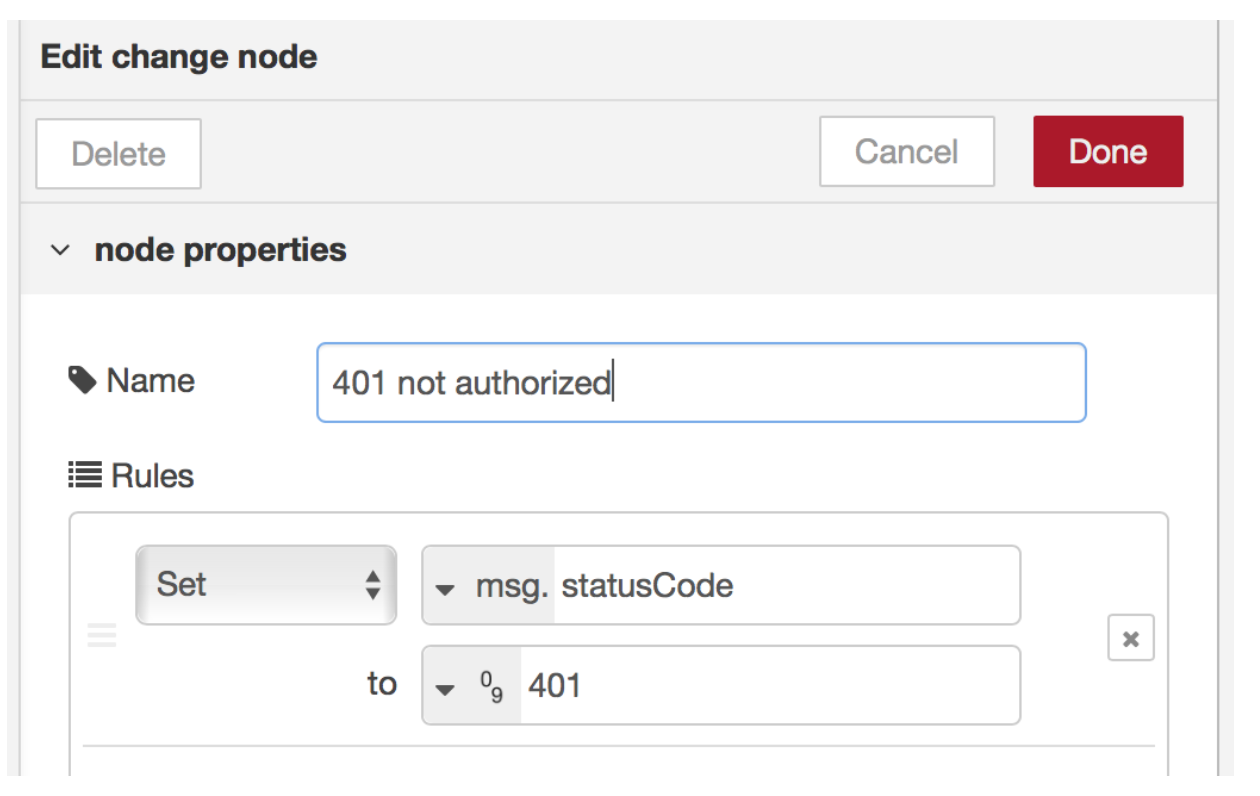
Figure 2: Setting the HTTP status code
Keep the device up to date with the latest software and operating system updates
Most malicious software (malware) relies on vulnerabilities (security gaps) that have often already been addressed in software updates (patches). These are available from the manufacturer. If you keep your software, especially the operating system up to date with the latest patches, then even if some rogue software does make it in to your device, it will be far less likely to be able to do anything.
If you are using a commercial IoT device with proprietary (non open-source) software, it is still likely that any substantial security flaw will result in the manufacturer issuing an update. So the advice is to always install manufacturer updates.
Minimise access privileges, remove the default ability to install new programs
This is especially useful advice if you are building an IoT project. The vast majority of malware still needs to run under an elevated user permission (administrative rights) to install. By simply running your device under an account that has no permission to install further software, your risk exposure drops.
You can still retain a separate account with permission to install new software. Just be sure not to run applications on your IoT device with those higher level permissions, except when you need to install software. For example, typing sudo in front of a command runs it as a superuser.
It is good practice to create an additional user account to run your applications on your Pi. This account should not have sudo privileges, so anyone exploiting a software bug in applications running in this user account will not be able to trivially gain root access to your Pi.
To create a new user, say, “john”, when you are logged in as “pi”, type
sudo adduser john
You will be asked for the password for the new account and other information, which you can leave blank if you want.
After that, you can logout from the pi account and log back into your new account.On a Pi, you can set “sudo” to require the user to type their password.
sudo nano /etc/sudoers.d/010_pi-nopasswd
and change the pi entry (or whichever usernames have superuser rights) to
pi ALL=(ALL) PASSWD: ALL
Firewalls
Firewalls are the digital equivalent of a brick wall. You can choose what sections of the wall will be open and allow things through, also what types of things they will allow through, and in which direction.
If your device has an operating system that you can access as an administrator, ensure you have a device firewall installed and active (switched on).
A Raspberry Pi is not ideal hardware for making a firewall - so install the firewall upstream of the Raspberry Pi. For example, on the router that is between your external internet connection (e.g. your broadband connection) and your WiFi and ethernet networks.
You should minimise the number of rules (acceptable connection types) that the firewall will allow.
If the device is proprietary (no accessible operating system), it may have manufacturer information available on whether it has a firewall in place or how it restricts connections and the flow of information. If there is no information available, then consider the device to be vulnerable.
Anti-malware security solutions
Malware threats are much more likely to affect Windows based operating systems than Linux operating systems, such as Raspbian. If on a commercial IoT device you have access to the Windows operating system and can add software, then you should install a reasonable anti-virus / anti-malware security solution on your device. Depending on the software you choose, this currently helps defeat a large proportion of malicious software. There are mainstream solutions that start from free. Be careful to select a trusted security solution provider.
Securing the information and applications on the device
Applying robust security to an IoT project is no simple task. You can certainly make your life easier (and the security requirements less) by limiting the collection and use of any sensitive information to the minimum. As an example, if you determined that your device must store personal information covered by a data protection regulation, your security and registration requirements would be huge.
However, if you determine that your device can operate without that information, life will be easier.
Large companies avoid collecting personal information wherever possible. This is because data protection legislation places a great responsibility on keeping 11that data secure, and if there is a breach of security, liability and bad publicity implications could be huge.
However, if you must store sensitive data it needs to be encrypted when stored (“data at rest”), or when transmitted across the network (“data in transit”). Encryption is basically changing information from plain text to an unreadable form using a cipher. If the information at rest or when transmitted is unreadable without the cipher, this acts as a further layer of security.
Encrypting any information that is stored on the device means that if information was stolen from the device, it would be unreadable without the cipher (the secret key) unless the cipher was broken.
Very often, passwords are encrypted using a“hash”function. This is a mechanism which enables the application that you log into to determine whether you typed the correct password, without actually storing the password itself. Thus, if the database of hashed passwords is stolen, the hackers don’t get the list of plain text passwords. They would have to use far more computationally intensive methods to find out which words had been used as passwords. A commonly used hash algorithm is SHA (Secure Hash Algorithm), designed by the United States National Security Agency. The hash value is sometimes referred to as a message digest.
This sounds rather counter-intuitive, so here is an example.
We will use the SHA-256 algorithm for this example. At the time of writing this variant of the SHA-2 algorithm has not been successfully attacked.
Suppose I register on a web site and give my username ‘Andy’ and password ‘dog’ (note this is a very poor choice of password, as it would very quickly succumb to a dictionary attack, but this is just an illustration).
The registration application stores an entry in its database of known users, using my username as the key, but using the hashed version of the password. So it might store:
Andy,cd6357efdd966de8c0cb2f876cc89ec74ce35f0968e11743987084bd42fb8944
Notice we didn’t store my actual password (‘dog’) anywhere.
When I want to log into the web site, I put in my username and password. Suppose I put in ‘Andy’ and ‘cat’. The log-in application hashes the password to give:
77af778b51abd4a3c51c5ddd97204a9c3ae614ebccb75a606c3b6865aed6744e
then looks up the ‘Andy’ record in the user database. It compares the hash of the stored (correct) password with the hash of the password I supplied. They are different. So the log-in application knows I did not enter the correct password, even though it has no idea what the correct password is. On the second attempt, I enter the correct password (‘dog’), which is hashed by the log-in application to:
cd6357efdd966de8c0cb2f876cc89ec74ce35f0968e11743987084bd42fb8944
This time the hashed password in the user database matches the hash of the supplied password and the application knows I typed the correct password. There are quite a number of open and free-to-use encryption software packages. Be sure to look into how to encrypt the information in transit and not only when it is at rest.
Using third party software on your device saves a lot of time. However, the security of that software is just as important as any you write yourself. Open source is a great asset that can allow IoT and other projects to be put together much faster than ever, and with “many eyes” on the published code, it is very difficult to intentionally insert malicious code. However, it is not impossible, either through obfuscation of an algorithm to make its operation very difficult to understand, or simply by accident. There have been numerous examples of defects found in source code that has been out in the open for many years. Of course, this can also happen with non-open source software, and you would have no way of knowing, as you can’t inspect the source code. Be careful to read all of the small print in any licence agreement - for example, you may be agreeing to share data that you want to keep secure.
The not-for-profit group known as the Open Web Application Security Project (OWASP) www.owasp.org maintains a list of the most frequent forms of software security vulnerabilities. It is a great resource of risks and practices to be aware of when building your own secure applications.
Password and identity management
If you are looking to build in a username / password routine in to your project, be aware that building your own to a safe and secure standard is almost impossible and certainly very time consuming. As an alternative, you can find scripts and services from existing password providers that can enable you to offer a log-in based on credentials that a person uses on other sites, such as Google, Facebook or Twitter. This removes the expense of trying to maintain your own password system.
This approach uses mechanisms such as OAuth 2, which enables the trusted third party (such as Facebook) to confirm to the requesting web site that it recognises me, and therefore I should be allowed to proceed with the authority that I have been granted on the requesting site. This level of authority bears no relation to any authority I may have on the authenticating site (e.g. Facebook), it is purely an acknowledgment that Facebook (or whoever) believes I am who I claim to be.
More advanced forms of application security
With the huge increase in cyber intrusions, many applications are starting to be built in a way that can insulate them from the device operating system. This means that instead of interacting with the device through the operating system, the applications operate in a secure environment that is made inaccessible to the operating system.
Another, similar technique that is gaining ground is called RASP or Runtime Application Self Protection. RASP looks to embed ongoing security checks into the way the application usually runs. As an example, if your application always only sends or receives a 64 character message once per hour, there could be an a compromise alarm if a message is detected with more than 64 characters or more frequently than once per hour.
This might be too sophisticated for a small IoT project but it’s worth being aware of.
Application security is constantly evolving. There are many excellent resources, such as OWASP mentioned above, to help you keep up to date with the challenges and risks.
Recovering from a security breach
The consequences of a cyber attack are typically a reflection of the value of the information or the function of the device that is compromised. If the device was a pacemaker, then clearly the consequences could be terminal. However, even if the device controls our heating or is used to process or relay our online banking transactions, the cost and impact can still be substantial.
Recovering from a breach is mostly about detecting the issue as early as possible and having the right preparation in place to be able to restore and recover the device.
Detection
Detection of a breach can sometimes be very difficult. Many forms of breach are deliberately designed to go unnoticed for as long as possible. If you only detect the breach after damage is done, there will be less you can do to protect your position.
A good tip is that if you notice anything suspicious happening on your IoT device, such as slow performance or other unexpected behaviours, it may be worthwhile performing a factory reset and restore from back-up as a proactive measure. Remember though that you may lose information and settings during that recovery process.
Reset and restore from backups
The best preparation is to make sure you have an easy ability to reset the device to its factory settings and then restore your configuration back onto the device. That means that you should (where possible) look to keep all the information backed up to a secure location. The more frequent and diverse your back-ups, the more likely you are to be able to recover the device without re-installing any compromised files or information.
For a Pi, the factory settings are restored by using a recently formatted SD card with the latest Raspbian (or other operating system) downloaded on to it.
Bluetooth
Criminals get more sophisticated all the time; you’ve probably heard about bluebugging (people taking over your Bluetooth device without your knowledge), bluejacking (where people send messages to other people’s devices, often for advertising purposes), and bluesnarfing (downloading information from someone else’s device using a Bluetooth connection) and doubtless there are more ways of hacking into Bluetooth networks still to come. Generally, though, providing you take reasonable and sensible precautions (such as not accepting unsolicited requests from people you don’t know) when you use Bluetooth devices in public places, Bluetooth security shouldn’t worry you too much.
Reliability
Reliability is also a major concern when it comes to the Internet of Things. There have already been incidents, accidents and even deaths caused by excessive trust in our connected devices - for example:
• A pet feeding device that relied on a major cloud service went down, causing the animal to be denied food until its owners returned home. (ref https://www.theguardian.com/technology/2016/jul/27/petnet-auto- feeder-glitch-google)
• An autopilot device in a car that relied on continuous driver oversight crashed, because the driver was not supervising the autopilot. (ref http://www.bbc.co.uk/news/technology-41242884)
In both of the cases above, the contractual agreement with the providers of the devices had conditions that meant that they should not have been relied on: -
The pet owners were not supposed to be fully reliant on the pet feeder.
The driver was supposed to continually oversee the autopilot system.
This means that we have to recognise the infancy of the Internet of Things.
Devices can do great and interesting things but we should not slip into a false sense of security and start trusting our lives with it.
For example, if your home heating system is controlled by a device that relies on a working internet connection from your house, do you have a backup plan to avoid the risk of hypothermia if your broadband fails during a heavy snow storm one winter, and you can’t turn your heating on?
The speed that items are coming to market and the number of devices that are experiencing issues means that a healthy degree of mistrust of the IoT is a good idea. You can still embrace all this new technology, just be careful not to completely rely on it.
If you are making your own IoT device, it is wise to have emergency systems and procedures in place for when something goes wrong.
Conclusion
In this chapter we have explored aspects of IoT security and given some practical advice on securing the projects you may develop.
We have seen that for all the fun we can have with the IoT, it is important to consider the risk and impact of having our devices compromised. It is therefore always wise to consider exactly how we set the security on our IoT devices and be prudent about what we choose to connect them to.
If you are building your own IoT application, keep in mind that you should look to apply security that is appropriate and proportionate to the potential function of the device. The more sensitive the activities you are getting your device to be able to do, the more stringent and robust you will need the security to be.
Whatever we do, we are unlikely to fully eradicate all chances of suffering a cyber attack. However, we can certainly substantially reduce the likelihood of it happening by taking the basic but logical security steps we have outlined. The security story doesn’t end here, but you have at least made your system secure from all but the most determined intruders.